Available now. Open source under the MIT license.
Edit Word, Excel and PowerPoint files with your coding agent.
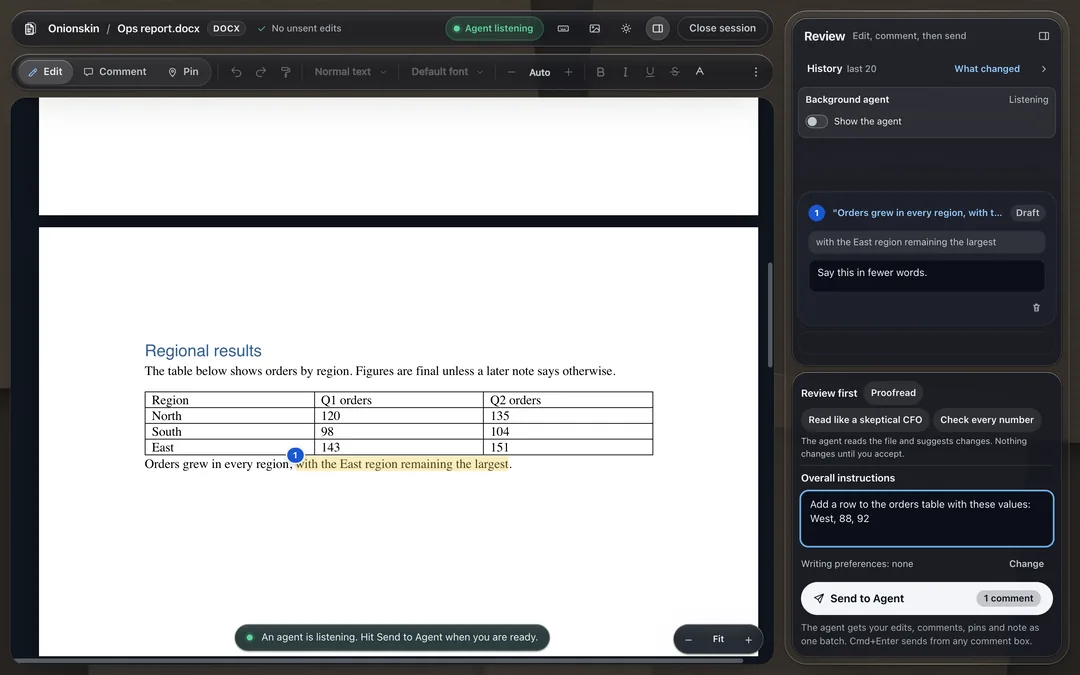
Type onionskin report.docx in a terminal, or tell Claude Code or Codex: open report.docx in Onionskin. The file opens in a browser editor with a review panel. Edit it, comment on a selection, cell, range, shape or slide, drop numbered pins, write one overall note, then press Send. The agent changes the real file, and the page reloads in place and keeps your position.
Once: paste this sentence into Claude Code or Codex
Install Onionskin from https://github.com/abe238/onionskinThen, in a terminal. Or tell your agent: open report.docx in Onionskin
onionskin report.docx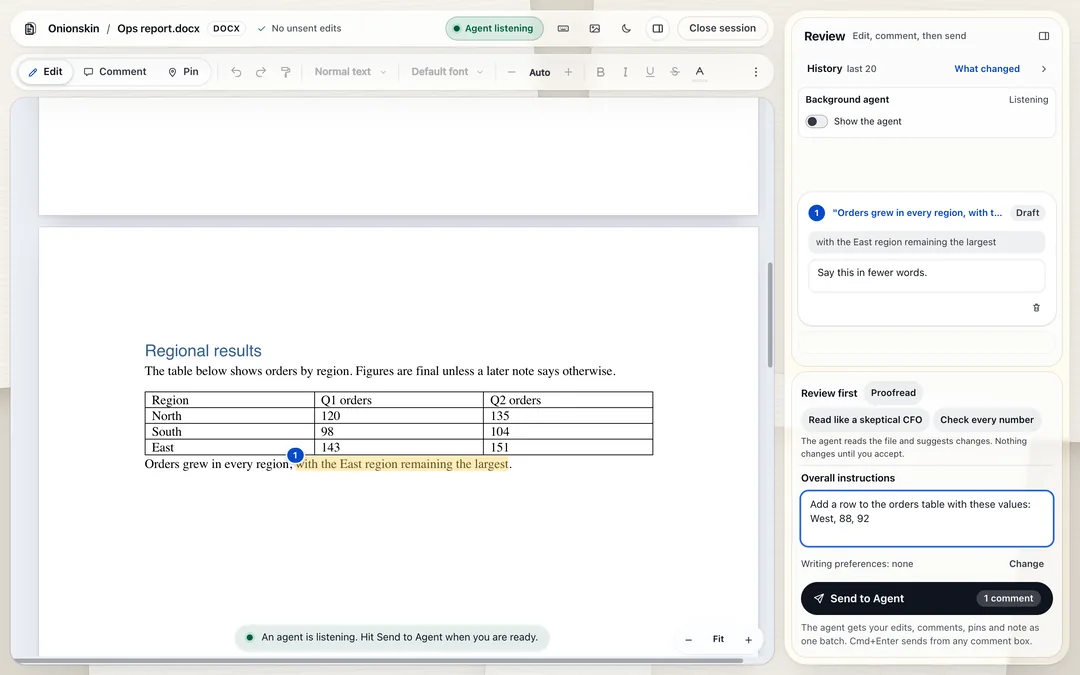
How it works
Three steps, and your agent does the typing in the file.
Open a file
In a terminal, type
onionskin report.docx. Or tell Claude Code or Codex:open report.docx in Onionskin. The file opens in a browser editor on your computer, with the document on the left and a review panel on the right.Mark it up
Edit text directly. Comment on a selection, cell, range, shape or slide, drop numbered pins, tap a one-tap request like Shorter or Friendlier, or write one overall note.
Press Send
The agent changes the real file. The page reloads in place and keeps your position, shows what changed, and lets you revert the last run.
What you can do in the editor
Everything you mark up lands in the review panel, so you can see the full request before you press Send.
Edit directly
Type in the document like any editor. Your own edits are saved to the file and listed in the review panel.
Comment on anything
Select a sentence, a cell, a range, a shape or a slide, and tell the agent what to change there.
Drop numbered pins
Pin a note to a spot on the page when a selection is not the right shape for the request.
One overall note
Ask for changes across the whole file, like making every heading bold or fixing inconsistent spacing.
One-tap stamps
Shorter, Friendlier, Fix grammar and Translate are one tap on a selection. You can edit the list.
The agent can ask you
When the agent needs an answer, it shows a question as a card in the panel, and you answer in place.
Review first
The agent reads the file and suggests changes as cards. Nothing changes until you accept.
History and revert
The last 20 updates are listed with a red and green change view and a What changed note. Revert the last run in one click.
Changes shown in place
After a run, the new words are drawn in where they stand, and the old words show briefly.
Real tracked changes
Export a Word file with real tracked changes. We checked it by opening it in Microsoft Word.
Your own voice guide
Ask the agent to build your voice guide. It drafts 12 sections, you review them, and nothing is saved without your approval.
Table rows, columns and slides
The agent can add or delete a table row or column in Word, and copy, delete or move a slide in PowerPoint. Charts are declined with a plain message: the agent says to insert the chart in Word or PowerPoint.
Merged cells in Excel
The agent is told which cells are merged, and a write into a covered cell is refused.
Watch the agent work
A Show the agent switch lists what the background agent is doing. Open in Terminal opens the same conversation in Terminal.
Two ways to start
Start from a terminal and Onionskin starts its own background agent. Start from inside Claude Code or Codex and the agent you are talking to does the work.
With the background agent, a real round from Send to the file changing took about 5 to 13 seconds in our runs on one Mac. Inside a Claude Code session a warm round took about 2 to 3 seconds. Onionskin needs Claude Code or Codex already installed.
- From a terminalType onionskin report.docx. The background agent is Claude Code only: it needs Claude Code installed and signed in, and it runs on your own Claude plan. If the plan limit is reached, the panel says so.
- From inside an agentSay open report.docx in Onionskin to Claude Code or Codex. We exercised both in real agent runs; a Codex round took about 26 seconds from Send to the file changing, in one run.
- Limited on purposeThe background agent can change your document only through Onionskin's own commands. It cannot read your other files: in our tests, reading outside its two folders, your home folder, network fetches and writes elsewhere were all refused. It is started without API keys in its environment. It can run read-only commands and read files inside its own work folder and the skill's reference folder.
- See what it doesThe Show the agent switch lists what it is doing. Open in Terminal opens the same conversation in Terminal.
- Codex without Claude CodeOn a Mac with Codex but no Claude Code, the terminal start says so in plain words and tells you to ask Codex.
Keep working while the agent works
You do not have to wait for a run to finish. Keep typing, and your edits are merged with the agent's version when it is done.
- WordA paragraph-level three-way merge, including formatting and moved paragraphs.
- Excel and PowerPointA strict merge: your edit is carried over only onto a place the agent did not touch.
Quick fixes, answered on your Mac
Select one sentence in a Word or PowerPoint file and ask for Fix grammar. Apple's built-in on-device model answers on your Mac. Nothing is downloaded, and nothing changes until you tap Use this.
Quick fixes need macOS 26 or later, Apple silicon and Apple Intelligence turned on. Without them, Fix grammar goes to your coding agent.
- Usually ready by the time you tapThe fix starts when the Quick ask box opens and takes about 0.85 seconds per sentence. On the first fix of a session, or an immediate tap, the card took about 0.3 to 0.4 seconds.
- Guarded textText inside quotation marks, numbers, dates and names are guarded. A suggestion that changes them is withheld.
- Plain commands use no AIReplace in N places and other plain quick commands run on your Mac with no AI at all.
How the pieces fit
Your edits start in a browser tab and finish in the file on disk. The editor and the server run on your computer, and your coding agent edits the file there.
- You press Send. The editor hands your edits, comments, pins and overall note to the Onionskin server on your computer.
- Your coding agent picks up that batch: Onionskin's own background agent (Claude Code) when you started from a terminal, or the agent you are talking to when you started from inside Claude Code or Codex.
- The agent edits the real file on disk.
- The agent reports back, and Onionskin checks the file against the snapshot it took before the run.
- The editor reloads in place and keeps your position, with a feed of what changed and a revert button.
The editor runs on your machine
The editor and its small server run on your computer, on the loopback address only, and the page makes no outside requests. When you press Send, your document goes to the coding agent you already use, Claude Code or Codex. Every batch carries the text of the whole document, not only the part you commented on, because the agent needs it to find the right place.
Your coding agent works the way it already does. Whatever it normally sends to its model provider still applies.
- No Onionskin cloudOnionskin itself does not upload your files. There is no Onionskin account and no Onionskin cloud.
- Loopback onlyThe local server listens on loopback, so other machines on your network cannot reach it.
- Snapshots before changesOnionskin keeps snapshots of your file, including the original, so a revert is one click.
- Some things never leave the MacQuick fixes and the plain quick commands are answered on your Mac and go nowhere else.
Works with the files you already have
Open a Word, Excel or PowerPoint file. The agent edits that same file.
- DOCXWord (.docx)Documents and reports
- XLSXExcel (.xlsx)Workbooks and sheets
- PPTXPowerPoint (.pptx)Decks and slides
Questions
Is Onionskin released?
Yes. The code is public on GitHub under the MIT license. Install it by pasting the sentence in the Install block into Claude Code or Codex. It is also on npm: run npm install -g onionskin-cli, then onionskin setup. This is pre-release 0.0.1.
Can I try it without installing anything?
Yes. The Try-it demo page replays one real recorded agent session in your browser. No install, and no AI runs.
Which coding agents does it work with?
Claude Code and Codex, in two different ways. Type onionskin report.docx in a terminal and Onionskin starts its own background agent, which is Claude Code only and runs on your Claude plan. Or tell Claude Code or Codex: open report.docx in Onionskin, and the agent you are talking to does the work. We exercised both in real agent runs.
Does my file leave my computer?
The editor and its small server run on your computer, and the page makes no outside requests. When you press Send, your document goes to the coding agent you already use, Claude Code or Codex, so whatever that agent normally sends to its model provider still applies. Every batch carries the text of the whole document, not only the part you commented on, because the agent needs it to find the right place. Only quick fixes and the plain quick commands stay entirely on your Mac.
Which file formats does it support?
Word (.docx), Excel (.xlsx) and PowerPoint (.pptx). All three run the whole loop, and the file's own formatting is kept because edits go through the same engine that renders it.
What does it need, and what is missing?
Claude Code or Codex already installed: Onionskin is for people who already use one of them. macOS only so far, because it is the only platform tested, and Node.js 22 or newer. There is no Windows or Linux version and no real-time collaboration. Quick fixes also need macOS 26 or later, Apple silicon and Apple Intelligence turned on. If something is off, run onionskin doctor to check the install.
How well is it tested?
Over 1,000 unit tests and 300 browser tests pass. On a second Mac with no Onionskin on it, the pasted install sentence, run by a real agent, installed it in 17.5 seconds, onionskin doctor reported OK, and a real round changed the file 4.1 seconds after Send. With the background agent, a real round took about 5 to 13 seconds in our runs on one Mac. Inside a Claude Code session, a warm round took about 2 to 3 seconds.
Can the background agent see my other files?
No. It can change your document only through Onionskin's own commands. In our tests, reading outside its two folders, your home folder, network fetches and writes elsewhere were all refused. It is started without API keys in its environment. It can run read-only commands and read files inside its own work folder and the skill's reference folder.
Can the agent add table rows or slides? What about charts?
Yes to the first two: it can add or delete a table row or column in Word, and copy, delete or move a slide in PowerPoint. Charts are declined with a plain message that says to insert the chart in Word or PowerPoint. A file produced by the new table edits was opened in Microsoft Word, and one with the new slide edits was checked with LibreOffice and a Python reader. It has not been opened in Microsoft PowerPoint.
What is the license?
MIT. Onionskin builds on a fork of the office-engine document engine by p10node (MIT) and on ideas from Peter Yang's human-review (MIT).
How is this different from pasting a document into a chat?
A chat hands you text back, and you copy it into the file yourself. With Onionskin, each note is anchored to the exact spot in the document, your agent edits the real .docx, .xlsx or .pptx file, and you see every change land in place with a revert button.
Who made it?
abe238. You can find him at abediaz.com, on GitHub as abe238 and on X as @abe238.
Built in the open
Credits
Onionskin stands on two MIT projects.
- office-engine by p10node (MIT): the document engine that renders and edits .docx, .xlsx and .pptx in the browser; Onionskin builds on a fork of it.
- human-review by Peter Yang (MIT): the human review loop idea: a command line tool and local server your agent waits on while you mark things up.
For AI coding agents
Install steps for AI coding agents.
- Install once: paste this sentence into Claude Code or Codex: Install Onionskin from https://github.com/abe238/onionskin
- Open a file: say "
open report.docx in Onionskin" (use the real file name), or runonionskin report.docxin a terminal. - The editor opens in the user's browser. When the user presses Send, apply their edits, comments, pins and overall note to that file.
Machine-readable versions of this page: llms.txt, llms-full.txt and index.md.
Why Onionskin?
Onionskin is a thin, strong, translucent writing paper with a high cotton content. Offices used it for typewritten carbon copies, permanent files and airmail. Thin sheets helped businesses save money on storage space, postage and copy typists. It was widely sold for office work from the 1920s to the 1970s.
Animators drew on it too. With the previous and next drawings placed under a sheet over a light, they could draw the frame in between. Animation software still calls that view onion skinning.
The name fits this tool: you lay your notes over the document, and the agent works through them, like tracing over a sheet you can see through.
Sources: CAMEO, Museum of Fine Arts, Boston, American Jewish Historical Society, Wikipedia: Onion skinning